
Tokyo Disney Resort App
Oriental Land Co.,Ltd.Travel & Local
1.8136.00 Reviews
- Version
- 3.11.5
- Installs
- 5.00M
- Age Rating
- Everyone
Screenshots
Our Review of Tokyo Disney Resort App
 Analysis by Appyee
I judge the Tokyo Disney Resort app less as a general travel tool and more as a companion for a very particular kind of day: visiting the resort and keeping plans, park information, and decisions together. That focus is useful when I’m on site, but it also sets expectations. This is not the app I’d choose to plan an entire Tokyo holiday or navigate the city; it makes most sense when the resort itself is the destination.
Oriental Land Co.,Ltd. develops the app, which is free to install and rated for Everyone. It sits in the travel and local category, has passed five million installs, and currently shows an average rating of 1.9 from around 9,300 ratings. That low average is worth taking seriously: I wouldn’t assume every visit will feel seamless just because the app covers many parts of a park day. The current version is 3.11.0, while the app’s release dates to March 19, 2020. Those details tell me it has had time to develop, but they do not, by themselves, establish what changed in each release.
Using the app for a day at the resort
So, I’ve been diving into the Tokyo Disney Resort App, and honestly, it's like having a magical guide in your pocket. If you’re planning a trip to Tokyo Disney, this app is your new best friend. Let me walk you through why I think this app is a must-have for your Disney adventure.
First things first, downloading the app is a breeze. Available on both Android and iOS, it’s just a tap away on your respective app store. Once you open it, you’re greeted with a colorful interface that screams Disney magic. The app’s design is intuitive, which means you won’t be scratching your head trying to figure out where to go next.
Setting up is straightforward. You’ll need to create an account or log in if you already have one. And boom, you’re in! The homepage is packed with all the essentials—park maps, wait times, and even dining options. It's like having your personal concierge.
Finding your way and choosing what to do
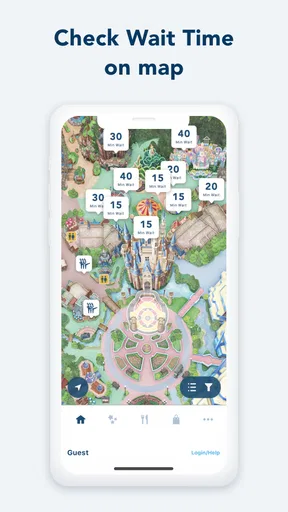
Let’s talk features because this app is loaded. The real-time map is a game-changer. You can see where you are in the park, find attractions, and even check out the wait times. No more wandering around aimlessly or missing out on your favorite rides.
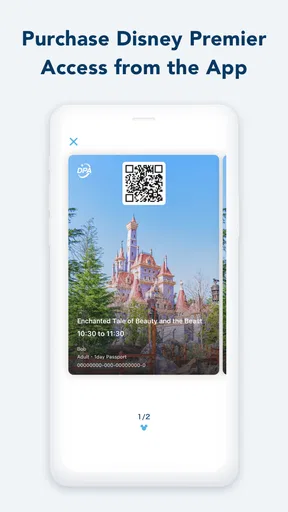
Speaking of rides, the Tokyo Disney Resort App lets you reserve your spot in line with Disney’s FastPass system. This is a lifesaver, trust me. You can book your FastPasses directly from the app, saving you from the notorious long lines. It’s like a VIP pass to the happiest place on Earth.
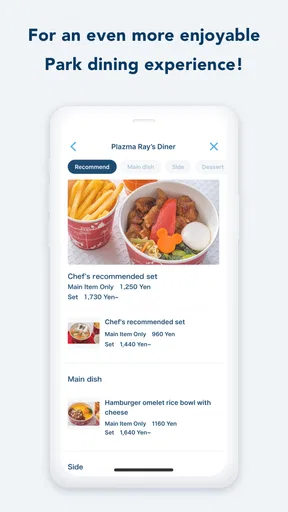
The app also keeps you in the loop with showtimes and special events. Whether it’s a parade or a fireworks display, you’ll have all the info at your fingertips. Plus, if you’re a foodie like me, you’ll love the dining section. You can browse menus, make reservations, and even check out the allergen information. It’s all about making your experience as seamless as possible.
Planning with others and using useful details
One of the coolest features is the personalization. The app learns your preferences and suggests attractions and events you might like. It’s like having a Disney planner with a personal touch. You can even create your own itinerary, which is super helpful for families trying to keep everyone happy.
And let’s not forget the interactive elements. You can take part in fun challenges and earn badges as you explore the park. It’s a great way to keep kids entertained and engaged.
For a family or group, I’d use the app as a shared reference point rather than expect everyone to follow one rigid schedule. Before splitting up, agree on a meeting place and a time, then use the park map to make sure each person knows where it is. That small bit of planning matters when one person wants a ride and another would rather find food or a show. The app can help organize the day, but it can’t make different energy levels or priorities disappear.
Tickets, bookings, and the practical trade-offs
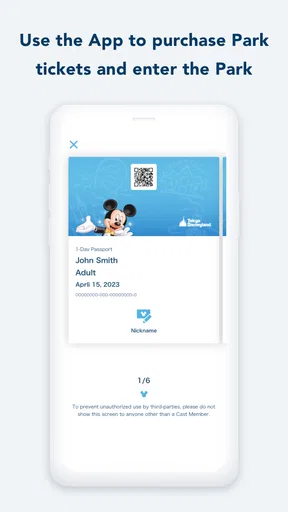
Another thing I love is how the app handles tickets and reservations. You can link your tickets to the app, which means no more fumbling with paper tickets. Just scan your phone at the entrance, and you’re good to go. It also tracks your dining and hotel reservations, making it easier to manage your schedule.
For those looking to splurge a little, the app offers a section on Disney merchandise. You can browse and purchase souvenirs directly, which is perfect for those who want to avoid crowded shops. Plus, they often have exclusive offers and discounts, which is always a win in my book.
What I’d check before relying on it
For a first visit, I’d avoid building a minute-by-minute plan around any one feature. Park conditions and the needs of your group can change the day, so I’d use the map and current information to make the next decision rather than treating an itinerary as a promise. If a ride is temporarily not part of the plan or a meal takes longer than expected, a flexible shortlist is more useful than a schedule that collapses after one delay.
I’d also prepare for the practical possibility that a phone becomes a bottleneck. Tickets, maps, reservations, and updates are convenient in one place, but they all depend on being able to access that place when you need it. I’d make sure everyone who needs the app knows how to find the important screens, keep the phone charged, and avoid leaving the group’s only copy of essential booking details with someone who may wander off. These are ordinary precautions, not a reason to avoid using the app.
In-app purchases range from $11.99 to $49.99 per item, so I’d treat the free download and optional spending as separate decisions. I’d check what an item offers and whether it actually suits my day before buying it, rather than assuming a purchase is necessary to use the app. That distinction is especially helpful for families setting a budget: the app can be part of the planning without turning every feature or decision into an automatic expense.
The app is most appealing to visitors who expect to spend the day at the resort, want park-specific information in one place, and are comfortable using a phone while moving around. It is less compelling for someone who wants a broad Tokyo guide, prefers paper maps, or only needs a simple route to the entrance. For city directions and places beyond the resort, a general maps or travel app is the better companion. I’d keep the resort app for park planning and use a regular map app for the rest of the trip rather than asking either one to do both jobs.
How it fits into the resort app landscape
Compared with the usual alternatives in travel, this app has a narrower purpose than a city guide or mapping app. Those tools are better for getting around Tokyo, comparing nearby places, or planning transport across a wider area. The resort app’s advantage is that its information is tied to a specific destination and the practical choices a visitor makes there. For me, that specialization is a strength on a park day and a limitation everywhere else.
I would not use its low average rating as proof that it will fail for every visitor, but I would take it as a reason to keep a backup plan. Before leaving for the park, I’d make sure I can access key ticket or reservation details and know what I’ll do if the app is slow or I can’t get to a screen quickly. If it works smoothly, it can reduce switching between tools; if it doesn’t, having a basic plan outside the app helps prevent a small technical snag from taking over the day.
What version history can—and cannot—tell you
The release date and current version give a useful snapshot of the app’s age and present build, but they are not a changelog. I can say that the current version is 3.11.0 and that the app has existed since March 19, 2020; I can’t responsibly turn those facts into a claim about which individual features were added, removed, or improved. For existing users, the sensible approach is to check the current screens before a visit rather than assume a familiar workflow has stayed identical.
That matters most for people returning after a long gap. I’d revisit the app before the travel day, confirm I can sign in, and look over the parts I expect to use—tickets, bookings, park information, or dining—while I have time to deal with any account or setup friction. A returning visitor may already know the resort, but familiarity with the parks doesn’t guarantee familiarity with the latest app layout.
For someone deciding whether to install it, the practical question is not whether the app is universally perfect; it is whether resort-specific information in one place will help with the way you like to visit. If you enjoy checking options as the day unfolds, it has a clear role. If you would rather put your phone away and make decisions spontaneously, you may only need to open it for a few essential tasks. Either way, I’d avoid treating installation as a commitment to manage every moment through a screen.
My verdict for different kinds of visitors
Wrapping it up, the Tokyo Disney Resort App is an essential tool for anyone visiting the park. It’s packed with features that enhance your experience, making your trip smoother and more enjoyable. From real-time updates to interactive maps and personalized itineraries, it’s like having a Disney expert by your side.
Whether you're a first-time visitor or a seasoned Disney pro, this app will make your visit to Tokyo Disney Resort more magical. So, if you’re planning a trip, do yourself a favor and download the app. Trust me, you won’t regret it!
My recommendation is more measured: I’d install it if I were visiting the resort and wanted a central place to check park details and organize the day, but I would not rely on it as my only travel tool. Families and first-timers may get the most value from having tickets, dining plans, and park information close at hand. A repeat visitor who already knows the layout may use it more selectively, while a traveler focused on Tokyo beyond the parks should prioritize a general navigation app.
What should you do before arriving? I’d sign in, make sure the relevant bookings or tickets are easy to locate, and decide which information matters most to your group. Do you need it for every step? Probably not. Is it worth having ready for a resort visit? In my view, yes—provided you stay flexible, keep your phone usable, and remember that a dedicated park companion is only one part of a good travel plan.
Verdict
Strengths of Tokyo Disney Resort App
- Easy navigation for first-time visitors.
- Real-time updates on wait times.
- Access to exclusive event info.
- Mobile food ordering feature.
- Interactive park maps included.
Limitations of Tokyo Disney Resort App
- Some features require constant internet.
- In-app purchases can be pricey.
- Location services drain battery.
- Limited language options available.
- Occasional app crashes reported.
Similar Picks in This Category
View All
Google Maps
Google LLC3.4

Google Maps Go
Google LLC4.1

Booking.com: Hotels & Travel
Booking.com Hotels & Vacation Rentals4.8

Google Earth
Google LLC3.8

Skyscanner Flights Hotels Cars
Skyscanner Ltd4.8

trivago: Compare hotel prices
trivago N.V.4.4
Frequently Asked Questions
What features does the Tokyo Disney Resort App offer?
The Tokyo Disney Resort App provides a variety of features to enhance your park experience. Users can view real-time waiting times for attractions, check show schedules, and reserve FastPasses. Additionally, the app allows for mobile food ordering and offers an interactive map to navigate the parks with ease.
Is the Tokyo Disney Resort App available in multiple languages?
Yes, the Tokyo Disney Resort App supports multiple languages, including English and Japanese. This makes it accessible to a wide range of international visitors. Users can easily switch languages in the app settings to ensure they understand all the information and features available.
Can I purchase tickets through the Tokyo Disney Resort App?
Absolutely, the app allows users to purchase park tickets directly. This feature provides a convenient and streamlined way to buy tickets without waiting in line. Once purchased, tickets are stored within the app, making entry into the park quick and hassle-free.
Does the app require an internet connection to function?
Yes, the Tokyo Disney Resort App requires an active internet connection to access its full range of features, such as real-time updates and mobile ordering. It's recommended to have a reliable data plan or access to Wi-Fi for optimal use while in the park.
Is the Tokyo Disney Resort App free to download and use?
The app is free to download and use. However, certain features, like purchasing tickets or making reservations, will involve additional costs. These costs are related to the services being purchased, not the app itself, which remains free to access all its basic features.
